 Sculptured docs
Import a Claude Code or Codex session
Turn a session you ran outside Sculptured into a run you can replay in History and a team you can run again, subagents included.
You may have run Claude Code or Codex on its own, outside Sculptured. You can still bring that session in. Sculptured reads the session file (plus its subagents) and gives you two things:
- A past run in History: the main agent and each subagent as a tree, with their messages, tool calls, tokens and timing. It's read-only.
- A team you can run: one agent per agent in the session, with the same kinds and models. Arrows go from each agent to the subagents it started. Each agent's job is what it was asked to do. Press Start to run it again.
Find the session file
Each session is one .jsonl file. The newest file in a folder is your most recent session.
Claude Code
| System | Where |
|---|---|
| macOS and Linux | ~/.claude/projects/<project>/<session>.jsonl |
| Windows | %USERPROFILE%\.claude\projects\<project>\<session>.jsonl |
<project> is the folder you ran Claude Code in, with every / (or \) replaced by -. For example, /home/ana/app becomes -home-ana-app.
Subagents. If the session started subagents, there's also a folder named after the session (<session>/subagents/). It holds one agent-<id>.jsonl and one agent-<id>.meta.json per subagent. Include that folder too, or the subagents show as agents with no transcript.
Codex
| System | Where |
|---|---|
| macOS and Linux | ~/.codex/sessions/YYYY/MM/DD/rollout-*.jsonl |
| Windows | %USERPROFILE%\.codex\sessions\YYYY\MM\DD\rollout-*.jsonl |
If you set CODEX_HOME, look there instead of ~/.codex.
Sub-agents. A Codex sub-agent's thread is its own rollout-*.jsonl from the same day. Choose those files together with the main one.
Import it
- Open Import a past run
Choose New project (on the Projects page, or under Projects in the top bar), open Advanced: import a team file or a past run, and find Import a past run.
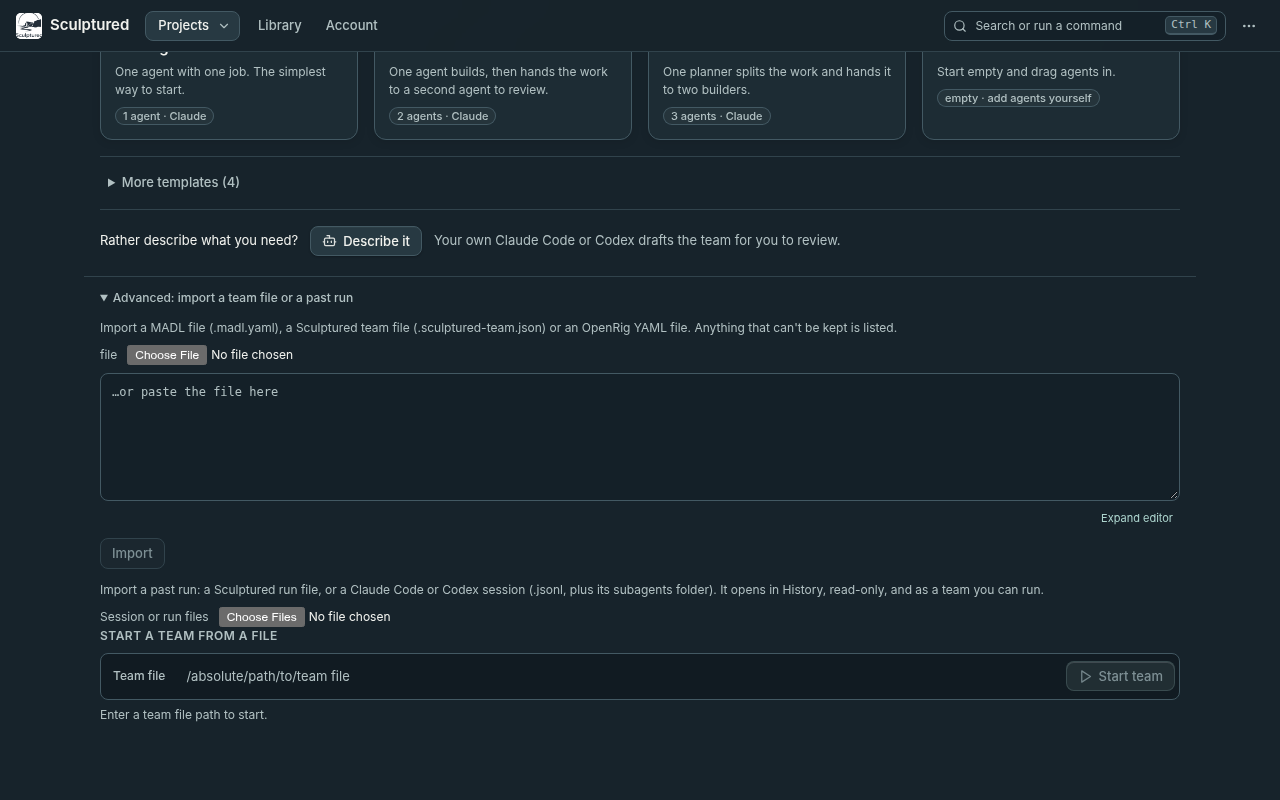
What to look for: **Session or run files** under Import a past run, after the team file import in Advanced. - Choose the files
In Session or run files, choose the session's
.jsonlfile. You can choose several files at once, for example a Codex session's rollouts. For a Claude Code session with subagents, use Add a subagents folder and pick itssubagentsfolder. - Check what was found
Before anything is created, Sculptured shows a summary, for example Claude Code session · 1 main agent, 3 subagents · 2 h 14 min · 1.2M tokens. It also lists:
- Not included: subagents the session mentions whose files you didn't choose.
- Lines Sculptured did not recognise: these are kept as raw evidence, never dropped.
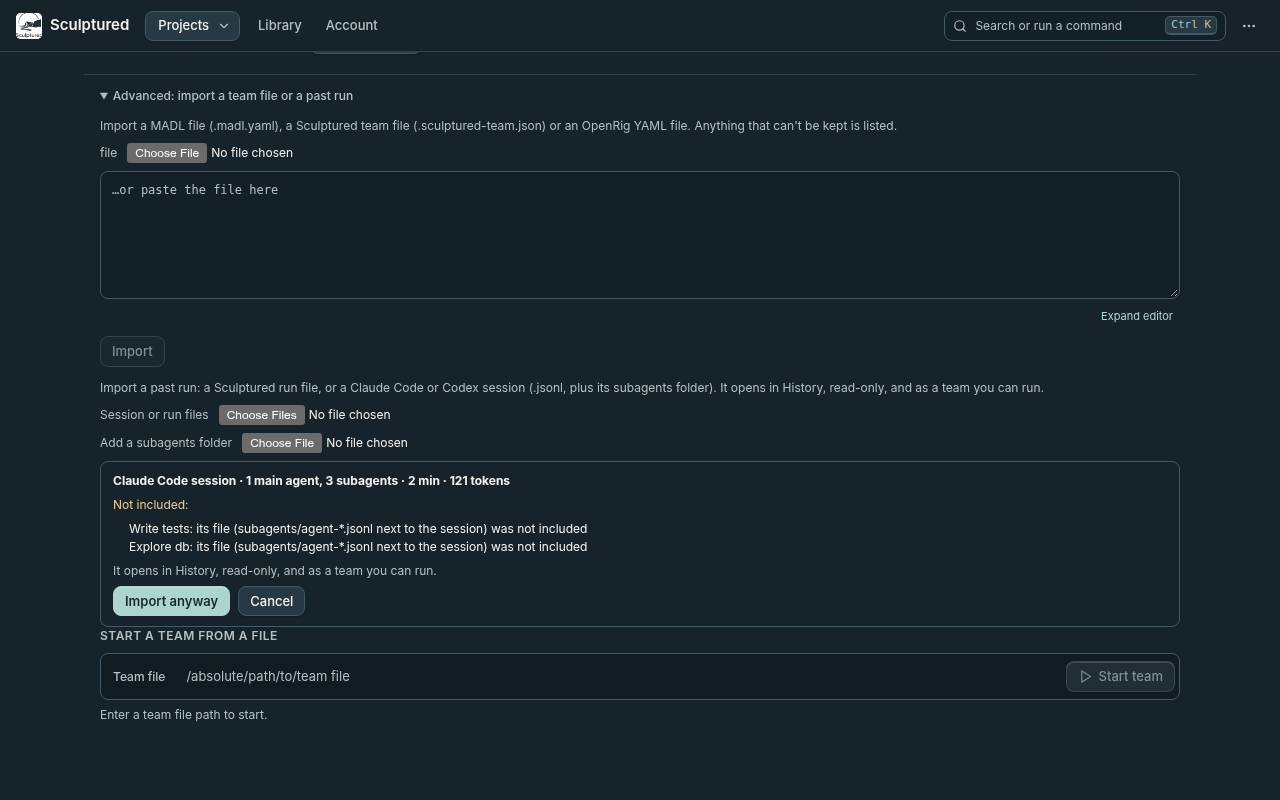
What to look for: the summary line, the subagents listed under **Not included**, and **Import anyway**. - Import
Press Import, or Import anyway if something is missing. The run opens in the new project's Results › History. The new team is in your projects, ready for the Design board.
What you get
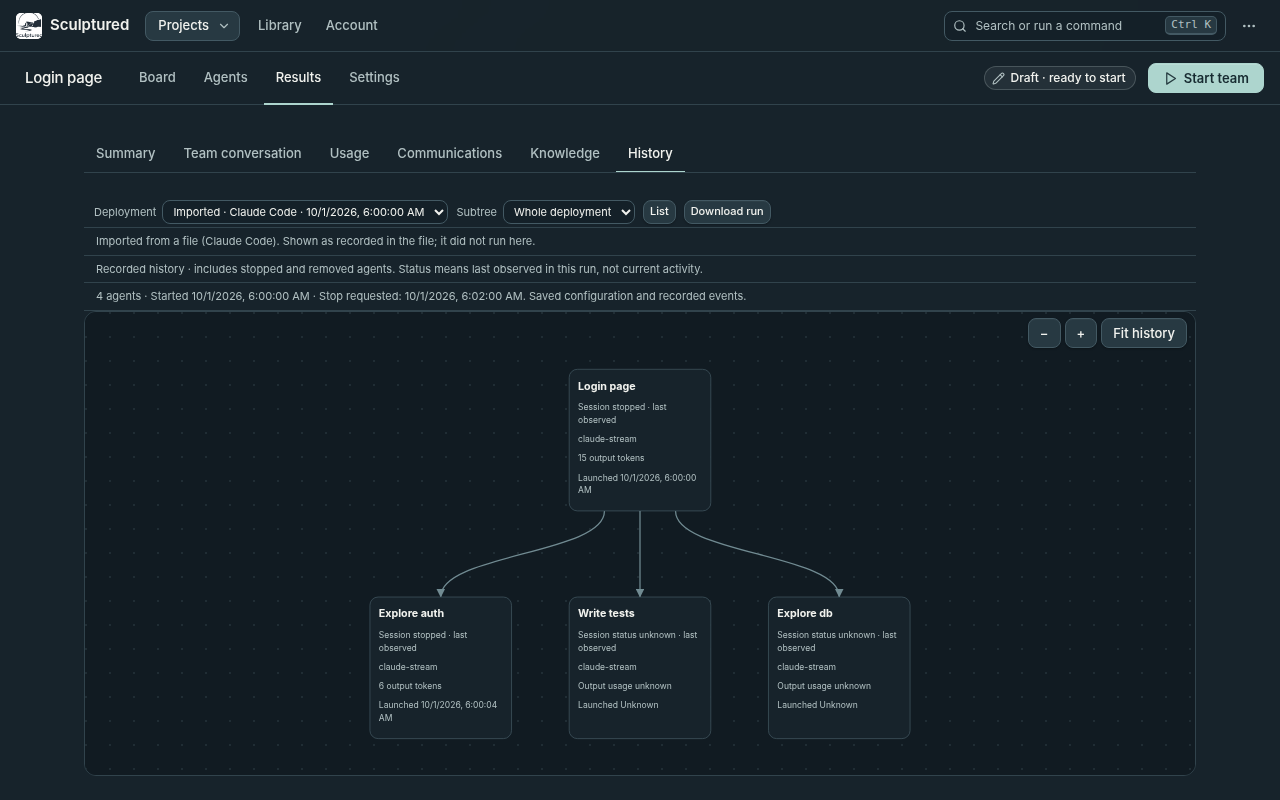
In History, the run looks like any other:
- the agent tree;
- each agent's messages, tool calls and results;
- tokens per agent and in total.
Every line is marked as converted from the session file. Sculptured didn't observe it live. Thinking isn't shown, the same as in live runs.
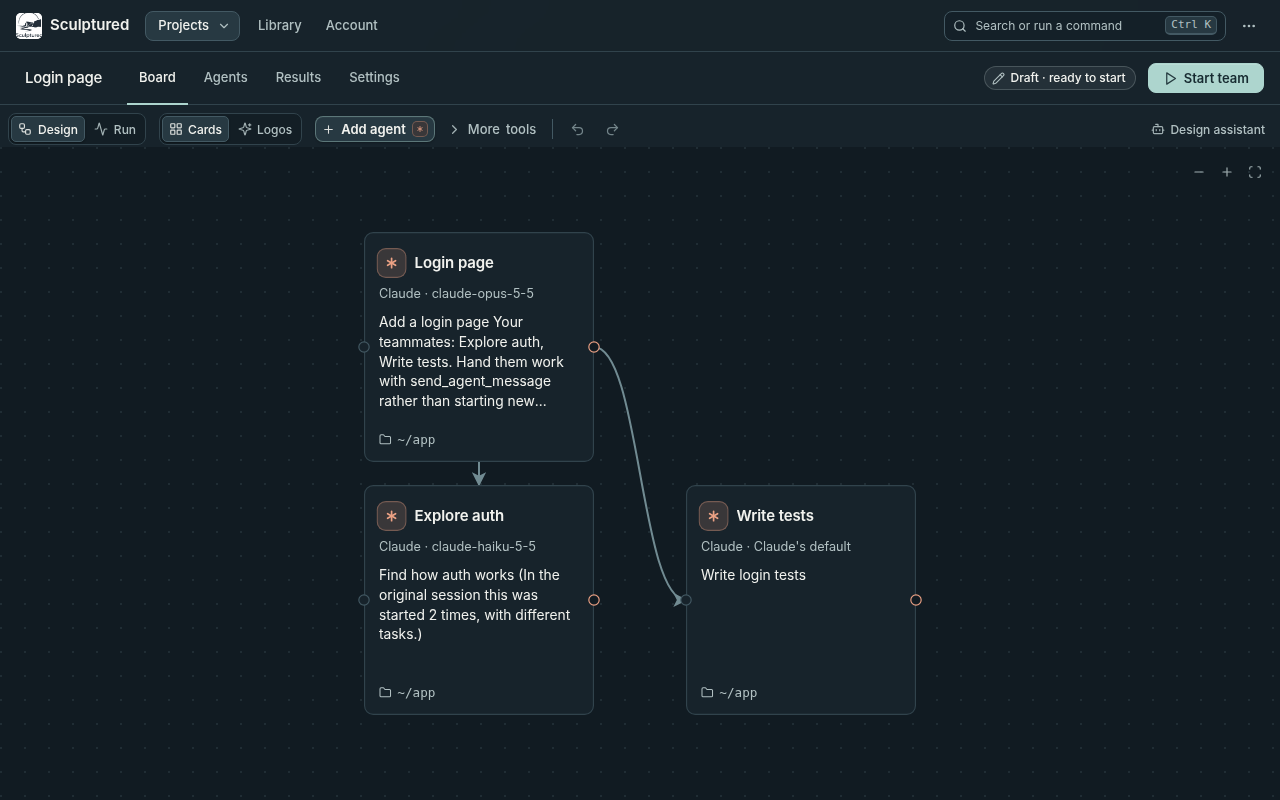
The team is built only from facts in the session:
| On the Design board | Comes from |
|---|---|
| Agent kind | Claude Code or Codex, whichever ran the session |
| Model | The model that agent used most |
| Main agent's job | Your first prompt in the session |
| A subagent's job | The task its parent gave it |
| Arrows | From each agent to the subagents it started |
| Folder | The folder the session ran in; the Design board warns you if it isn't allowed on this computer |
Repeated subagents: if one kind of subagent was started several times (for example three Explore subagents), the team has one agent for it, and its job notes how many times it was started. The run in History still shows every one.
When you run it, the main agent is told who its teammates are and to hand them work, rather than start new copies.
Improve the team with AI
A team built straight from a session reads like that session: its jobs are one-off prompts. To turn it into a team you'd reuse:
- Open the team's Settings tab.
- Open More settings and choose Improve this team with AI.
- Pick Claude Code or Codex, then press Ask. It uses your own CLI and plan.
What it reads: a summary of the session, which includes each agent, what it was asked, which tools it used and how often, and the last thing it said. It never sees file contents, tool inputs or tool output.
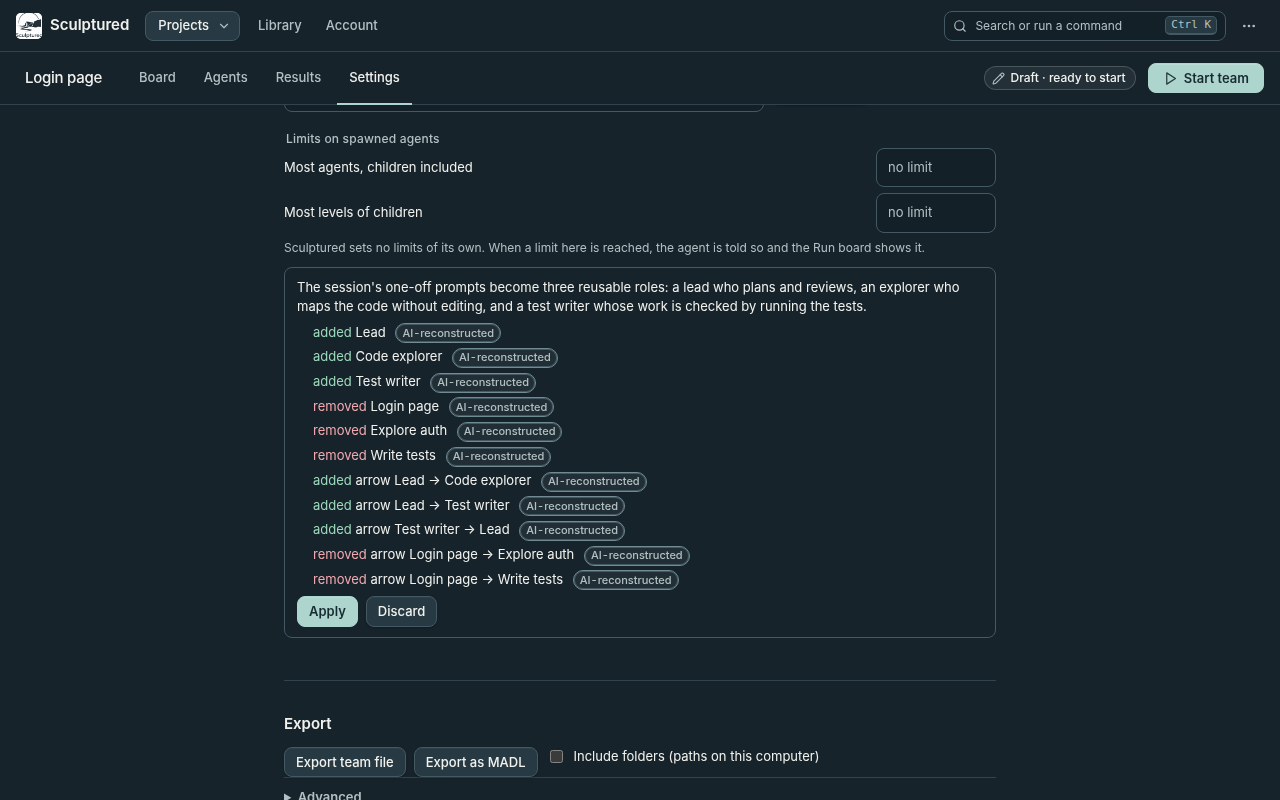
What comes back: a list of proposed changes, such as agents added, changed or removed, and arrows added or removed. Every change is labelled AI-reconstructed. Nothing changes until you press Apply, and Discard leaves the team as it was.
Privacy
- Where the session goes: your prompts and code stay in your own Sculptured, local or hosted, and are stored like any run.
- Analytics: it records only that an import happened, which tool it came from, and how many agents it had. It never records content.
If it doesn't work
| Message | What to do |
|---|---|
| This isn't a Claude Code or Codex session file | Choose the .jsonl from the folders above, not a .json export or a copy of the chat. |
| These files are from 2 different sessions | Import one session at a time. |
| These files are from different tools | Don't mix Claude Code and Codex files in one import. |
| Choose the session's own .jsonl file too | You chose only subagent files. Add the main session file. |