 Sculptured docs
Questions and approvals
What happens when an agent asks you something, how long it waits, and what it does if nobody answers.
When an agent needs a decision, Sculptured shows needs you and opens a question card. A restricted Claude agent can also request permission to run a tool. Answer on the card before its deadline; if the deadline passes first, the timeout behavior applies.
sequenceDiagram
  participant A as Agent
  participant S as Sculptured
  participant Y as You
  A->>S: "request_input: Which colour?"
  S->>S: "record question, agent needs you"
  S-->>Y: "Answer button, Needs You"
  alt you answer in time
    Y->>S: answer
    S->>A: "your answer"
  else nobody answers in time
    S->>A: "decide yourself, then record_decision"
    A->>S: "record_decision: what it chose and why"
  end
Where questions come from
| Source | What it is |
|---|---|
Agent question (request_input) | The agent asks a question and may offer choices and a short header. The card shows whether it accepts a choice, free text or both. |
| The CLI's own question | A question Claude Code or Codex raises through its own prompt. |
Tool approval (approve) | Only for a Claude agent set to Restricted: "Allow Bash to run?", with the tool's input. |
The tools agents use are listed in Agent tools.
Where you see them
- The agent's card turns to ◉ needs you and shows an Answer button.
- Results › Team conversation has a Needs You row with an Answer button per agent. Pick Questions in its filter to see every question the team raised.
- The project's status in its tab row reads "Needs you · N of M". The Projects page and the Projects menu in the top bar show each project's status.
- A toast appears when an agent you are not looking at starts needing you. It stays until you click it.
- The Questions page (a tab of the project, beside Agents) lists every question the team's agents asked, newest first: those waiting for you, answered right there; your answers, with the choices each question offered and the one picked; what an agent decided when nobody answered in time (agent-reported); and withdrawn ones, with why. Filter by what happened or by agent. Each agent's page has its own Questions tab with the same list for that agent.
Answer opens the agent. Its questions show at the top of its conversation, and the first one takes the focus.
An agent can say how urgent its question is. Urgent ones come first in Needs you, marked Urgent, says the agent; ones it calls low come last. This is the agent's own word, not Sculptured's judgment. A question nobody answers still times out, and the agent decides for itself.
Answer in the app
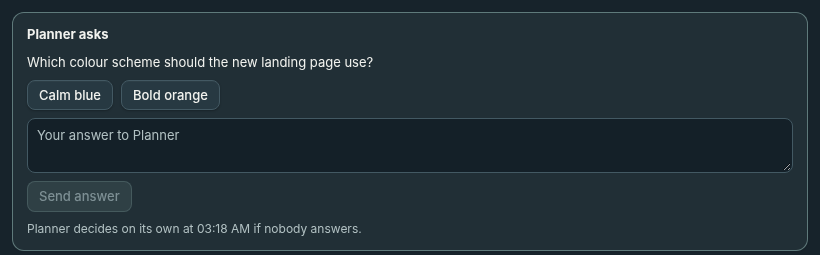
Each question is a card above the agent's conversation. It shows what the agent asked, word for word, and when it stops waiting.
| The agent asked | What the card offers |
|---|---|
| A question with choices | One button per choice. If it also takes your own words, a box and Send answer. |
| A question in its own words | A box for your answer and Send answer. |
| To run a tool (Restricted agents) | The tool, its input under Tool input, and Sculptured's reading of what it would do, such as "deletes files". Then Allow or Deny. |
- Deny with a reason. Type a reason before you choose Deny, and the agent is told it. Without one, it is told "The person running this team did not allow this."
- Send again. If your answer may not have reached the agent, the card says why, in the computer's words, and offers Send again.
- After the timeout. The card stays until you dismiss it with OK. For a question, it shows what the agent decided, and you can send a late answer. For a tool approval, it says it was allowed automatically, and Deny now tells the agent it should not have been allowed and to undo what it did if it can.
How answers are delivered
Your answer is recorded first and then sent to the agent. The log reads question raised, then answered, then the agent's reply.
- One answer wins. If two answers race, or an answer races the timeout, exactly one resolves the question. A second try gets "This question was already answered or withdrawn, so your answer was not sent."
- Choices. An answer must fit the question: one of its choices, or your own words. Otherwise you get "That answer does not fit this question."
- Delivery in doubt. If Sculptured could not confirm that the answer reached the agent, the answer stays recorded and is marked as unconfirmed, and the agent stays in Needs you until that is settled. An answer that certainly did not arrive opens the question again while the agent can still take it.
When nobody answers
Each question waits 10 minutes by default. A team can set a timeout from 1 to 1440 minutes. An unanswered question lets the agent decide; an unanswered tool approval is allowed automatically.
An agent question times out
record_decision with what it chose and why. That decision is recorded as agent-reported. If the agent says nothing, the decision's source stays unknown.A tool approval times out
You answer after the timeout
When a question is withdrawn
A question is marked withdrawn when its waiting call can no longer receive an answer. The card records the reason:
- the agent's turn was interrupted, or its process ended;
- Sculptured itself restarted while the agent waited.
After a Sculptured restart, the agent's computer sends the waiting call again when it reconnects, so the question can appear again as a new one.
When the computer is offline
Sculptured can record your answer while the agent's computer is offline. Delivery waits for the connection to return:
- The question stays open. You can still answer it.
- Your answer is kept.
- When the computer reconnects, the agent's waiting call is sent again and gets your answer. It is answered once, not asked twice.
Answers are kept for six hours for a computer that comes back. See When the computer drops off.
Workflow decisions
Teams with a workflow can include a stage where a person decides. Those items wait under Work evidence on the Run board, in Waiting for you. Each shows the stage's prompt, the latest evidence and one button per outcome. You can add an optional note. Each step in an item's history is labelled agent-reported, verified check, person's decision or Sculptured. See Workflows.